
Logging in to Europefortune takes an email address and password, works the same on desktop and mobile browsers, and opens the cashier, bonuses, VIP club and full game lobby in GBP. The sign-in form sits behind the Log In button in the top-right corner of the site, includes a password-reset link, and can be secured further with a strong, unique password. Below you can see how to sign in, recover access, and resolve common login problems.
Alongside the step-by-step sign-in, the sections below explain how account verification works, what players reach once logged in, and how to keep an Europefortune casino login secure on any device.
| Login essentials | Details |
|---|---|
| Where to log in | The Log In button, top-right on europefortunes.org |
| Login method | Email address and password |
| Password reset | Forgot your password link on the login form |
| Device support | Desktop, tablet and mobile browsers |
| Session security | SSL-encrypted connection; verified-only cashier access |
| When verification appears | Before the first withdrawal |
| Currency | GBP for UK accounts |
| Support | 24/7 live chat and email |
How to log in to Europefortune
Signing in follows the same short sequence on every device, using the email address set at registration. The password field is case-sensitive and can be revealed with the eye icon if needed.
Step-by-step login
Follow these steps to reach the account dashboard:
- Open europefortunes.org in your browser.
- Select the Log In button in the top-right corner of the page.
- Enter the email address used during registration.
- Type your password - the eye icon reveals it if you need to check.
- Select Log In and wait for the dashboard to load without refreshing.
Create an account if you don't have one
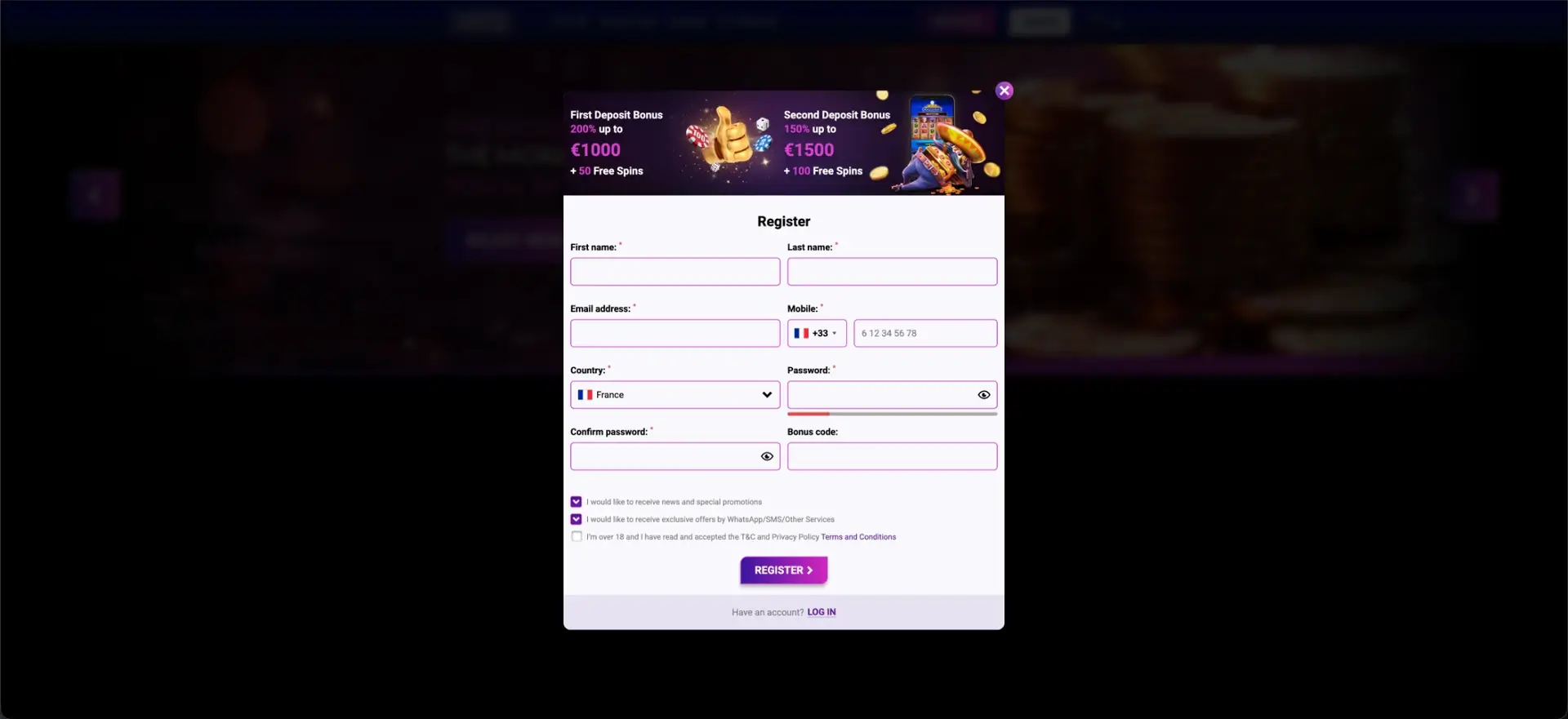
Players without a profile can move straight from the login window to registration using the Register link at the bottom of the form. The sign-up form is a single step and unlocks the welcome package on the first deposit.
Quick registration flow
The registration form asks for a short set of details:
- Enter your first and last name.
- Add your email address and mobile number with the correct country code.
- Select your country and set a password, then confirm it.
- Add a bonus code in the optional field if you have one.
- Confirm you are over 18, accept the terms, and select Register.
Secure login practices
A casino login protects both a balance and personal data, so a few habits make an Europefortune login harder to compromise. The platform encrypts the connection, but account-side security still depends on the player.
- Use a unique, strong password that is not reused on other sites.
- Check the secure address of the official site before entering credentials.
- Avoid logging in over shared or public Wi-Fi where possible.
- Never share login details, and log out on shared devices.
Password recovery
A forgotten password can be reset directly from the login window, so there is no need to contact support for a routine reset. The reset link sits next to the password field on the sign-in form.
Reset steps
To restore access to an Europefortune casino login:
- Open the login window and select Forgot your password?
- Enter the email address linked to the account.
- Open the reset email and follow the secure link.
- Set a new password and confirm it.
- Return to the login form and sign in with the new password.
Mobile login
Because the platform runs in the browser, the mobile login is identical to the desktop version and needs no app. The sign-in form scales to smaller screens, and a home-screen shortcut can shorten the route to the login page.
- Open europefortunes.org in Safari, Chrome or any modern mobile browser.
- Tap Log In and enter the same email and password used on desktop.
- Add a home-screen shortcut for one-tap access on future visits.
Troubleshooting common login errors
Most sign-in problems come down to credentials, browser state or a pending verification step. The sections below cover the usual causes and quick fixes.
Incorrect credentials
The most common cause is a mistyped email or password. Check that caps lock is off, reveal the password with the eye icon to confirm it, and use the reset link if the details still fail.
Browser or cache issues
If the page loads but the form does not respond or the session drops after submission, clear the browser cache and cookies, disable extensions that block scripts, and try a different browser before contacting support.
Account not yet verified
An account can log in before verification, but the cashier stays restricted until identity checks are complete. If withdrawal options are greyed out, the account most likely needs to finish the verification step described below.
Account blocked or restricted
If sign-in is refused entirely, the account may be temporarily restricted, self-excluded or under review. In that case, contact live chat, which can explain the status and the next step.
What you access after login
A successful login opens the full account area, where balances, bonuses and cashier tools sit together. Everything is presented in GBP for UK accounts.
- The full lobby of 2,000+ games, including slots and live tables.
- The GBP cashier for deposits and withdrawals.
- Active bonuses, the weekly Bonus Wheel and VIP rewards.
- VIP-club status, points and cashback tools.
- Responsible-gambling limits, time-outs and self-exclusion settings.
Account verification (KYC)
Verification is required before the first withdrawal, in line with anti-fraud and anti-money-laundering rules. It is a one-time process for most accounts and protects both the player and the casino against identity theft. Completing it early means a payout is not held up later.
- Proof of identity: a passport, national ID or driving licence.
- Proof of address: a recent utility bill or bank statement.
- Payment ownership: confirmation of the method used to deposit, where requested.
Europefortune login FAQ
The questions below cover the points UK players most often raise about signing in to Europefortune.
How do I log in to Europefortune?
Select the Log In button in the top-right corner of europefortunes.org, enter the email and password set at registration, and the account dashboard loads. The same login works on desktop and mobile browsers.
I forgot my Europefortune password - what do I do?
Open the login window and select Forgot your password?, enter the email linked to the account, then follow the secure link in the reset email to set a new password.
Why can't I log in to my account?
The usual causes are a mistyped email or password, a browser cache issue, or an account under review or self-exclusion. Reset the password, clear the cache or try another browser, and contact live chat if sign-in is still refused.
Do I need an app to log in on mobile?
No. Europefortune runs in the mobile browser, so the login is the same as on desktop with no download required. A home-screen shortcut can speed up access.
When do I need to verify my account?
Verification is requested before the first withdrawal. It usually means uploading proof of identity and proof of address, and completing it early keeps later payouts moving without delay.
Is the Europefortune login secure?
The connection is protected with SSL encryption and cashier access is limited to verified holders. Account-side security also depends on using a unique, strong password and logging in only on trusted devices.